Laptop Cooling Pad
Showing all 5 results
-
Gaming Accessories, Laptop Cooling Pad
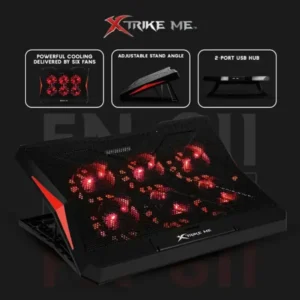
Xtrike-Me Fn811 Laptop Cooling Pad 6 Fans 2 USB Ports Support 17 Inch
 Gaming Accessories, Laptop Cooling Pad
Xtrike-Me Fn811 Laptop Cooling Pad 6 Fans 2 USB Ports Support 17 Inch
Keep your laptop cool and running efficiently with the XTRIKE ME FN811 Laptop Cooling Pad Stand. Designed for notebooks ranging from 9″ to 17″, this cooling pad features six powerful 60mm fans that deliver optimal cooling performance. With a red LED backlight, adjustable stand angles, and a 2-port USB hub, it’s perfect for improving airflow and enhancing your laptop’s performance. The sturdy metal mesh and plastic build ensure durability, while the quiet operation (17-23dBA) keeps distractions at bay.
SKU: n/a -
Laptop Cooling Pad
N6 Adjustable Laptop Cooling Stand with Silent Fan | Foldable USB Cooling Pad for Laptops & Tablets Up to 15.6 Inch
 Laptop Cooling Pad
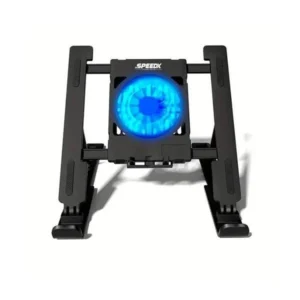
N6 Adjustable Laptop Cooling Stand with Silent Fan | Foldable USB Cooling Pad for Laptops & Tablets Up to 15.6 Inch
N6 Adjustable Laptop Cooling Stand features a high-speed silent cooling fan, adjustable height up to 9 cm, and a foldable design for improved airflow and ergonomic comfort. USB powered and compatible with laptops and tablets up to 15.6 inches, it’s ideal for work, study, gaming, and everyday use.
SKU: n/a -
Gaming Accessories, Laptop Cooling Pad
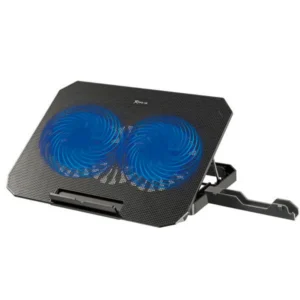
Xtrike Me Fn818 Laptop Cooling Pad
This Laptop Cooling Pad Stand is a USB-powered cooling solution for 11–17 inch laptops, featuring dual 140mm blue LED fans, adjustable fan speeds of 1000–2400 RPM, and a durable metal mesh surface for improved airflow and heat dissipation. Its two-level height adjustment provides a more comfortable viewing and typing angle, while the dual USB ports add convenient connectivity. Slim and portable, the FN818 is suitable for gaming laptops, office work, studying, streaming, and everyday laptop use.
Feature Highlights:
- Supports 11-inch to 17-inch laptops
- Provides strong airflow beneath your laptop
- 1000–2400 RPM
- Adjustable viewing and typing position
SKU: n/a -
Gaming Accessories, Laptop Cooling Pad
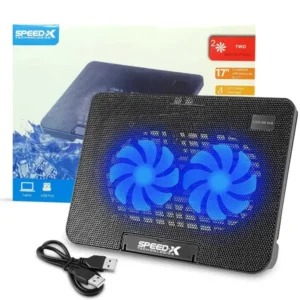
Speed-x N99 2 Fan Cooling Pad With Two USB And Light
Looking for the best price laptop cooling pad ? Order the latest SPEED-X N99 2 FAN COOLING PAD WITH TWO USB AND LIGHT online in Pakistan with updated features like dual high-speed fans, USB connectivity with built-in light, angle adjustment, and compatibility with laptops up to 17 inches available now at Marko Pakistan.
SKU: n/a -
Gaming Accessories, Laptop Cooling Pad, Mobile Holders
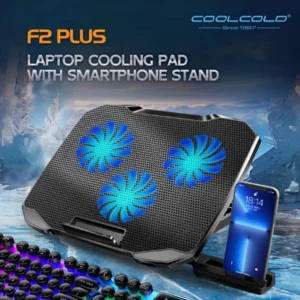
F2 Plus Coolcold Gaming Cooler 3 Big Fans Cooling Pad For 10-15.6
 Gaming Accessories, Laptop Cooling Pad, Mobile Holders
F2 Plus Coolcold Gaming Cooler 3 Big Fans Cooling Pad For 10-15.6
Looking for the best laptop cooling pad ? Order the latest F2 PLUS GAMING COOLER COOLING PAD FOR 10-15.6 online in Pakistan with updated features like three high-speed fans, ABS+metal construction, fan speed of 1500±10% RPM, and support for laptops from 10 to 15.6 inches available now at Marko Pakistan.
SKU: n/a
Looking for a laptop cooling pad in Pakistan? Explore our range of laptop cooling pads and adjustable cooling stands designed to improve airflow beneath your laptop while providing a more comfortable setup for gaming, work, study and everyday use.
Choose from compact USB-powered cooling stands and multi-fan cooling pads for different laptop sizes. Our collection includes options for laptops up to 15.6 inches and 17 inches, with features such as adjustable height or viewing angles, metal mesh surfaces, USB connectivity and multiple cooling fans.
Read More
Laptop Cooling Pads for Better Airflow
A laptop cooling pad places your laptop on an elevated surface and uses one or more fans to circulate air beneath the device. This can help improve airflow around the laptop’s underside, particularly during extended gaming sessions or other demanding workloads. The actual cooling benefit depends on the laptop’s design, workload, room temperature and existing cooling system.
For a larger laptop setup, the Xtrike Me FN818 Laptop Cooling Pad supports 11–17 inch laptops and uses two 140mm fans with adjustable fan speeds from 1000–2400 RPM. It also has a metal mesh surface, two USB ports and adjustable height levels.
Adjustable Laptop Cooling Stands
If you want both cooling and a more comfortable working position, an adjustable laptop cooling stand can be a practical option. The N6 Adjustable Laptop Cooling Stand supports laptops and tablets up to 15.6 inches and features a USB-powered fan, foldable design and height adjustment of up to 9 cm. Its metal mesh surface is designed to allow airflow beneath the device.
Dual-Fan and Multi-Fan Laptop Cooling Pads
The number of fans is one of the differences between cooling pad models, but it should not be the only factor when choosing one. Fan size, airflow design, laptop compatibility and the cooling pad’s physical dimensions also matter.
The Speed-X N99 Cooling Pad uses two built-in fans, USB power and an adjustable angle, with support for laptops up to 17 inches. It also includes two USB ports and built-in lighting.
For a gaming-focused setup, the F2 Plus CoolCold Gaming Cooler uses three fans and supports laptops from 10 to 15.6 inches. It combines an ABS and metal construction with blue LED lighting and a 1500 ±10% RPM fan speed specification.
How to Choose a Laptop Cooling Pad
- Check laptop size: Make sure the cooling pad supports your laptop’s screen size and physical dimensions.
- Consider the fan setup: Compare the number and size of fans, along with the stated fan speed, rather than choosing based on fan count alone.
- Look for adjustability: An adjustable stand can improve your viewing and typing position as well as elevate the laptop for airflow.
- Check USB requirements: Most of these cooling pads are USB powered, so check the included cable and USB-port arrangement.
- Gaming laptops: For larger or more demanding gaming laptops, check compatibility carefully before choosing a cooling pad.
Frequently Asked Questions About Laptop Cooling Pads
What does a laptop cooling pad do?
A laptop cooling pad elevates the laptop and uses built-in fans to circulate air beneath it. Better airflow can help manage heat, although the actual temperature reduction varies by laptop, workload and environment.
Which laptop sizes are supported?
Compatibility varies by model. The cooling pads in this collection include options for laptops from 10 inches up to 17 inches. Check the specifications of the individual cooling pad before purchasing.
Are laptop cooling pads USB powered?
Yes. The models in this collection use USB power, so they can generally be powered directly from a compatible USB port. Check the individual product specifications for the exact USB configuration.
Is a laptop cooling pad useful for gaming?
A cooling pad can improve airflow beneath a laptop during gaming and other demanding workloads. Gaming laptops should be matched with a cooling pad that supports their size and provides an appropriate cooling surface and fan configuration.
Should I choose a dual-fan or triple-fan cooling pad?
Fan count alone does not determine cooling performance. Consider the fan size, airflow design, laptop compatibility, adjustability and the cooling requirements of your laptop when comparing models.